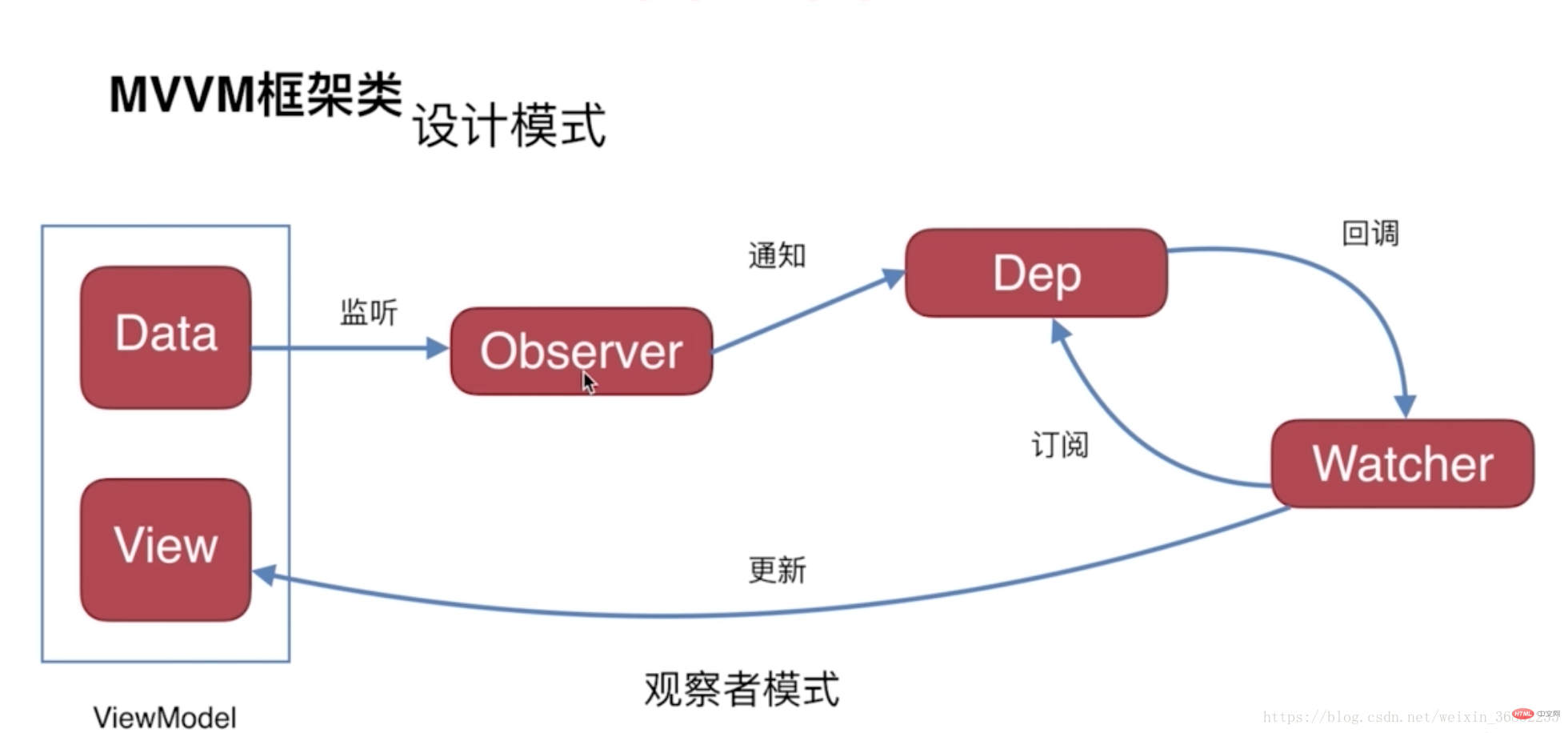
Vue数据双向绑定是通过数据劫持结合发布者-订阅者模式的方式来实现的。首先对数据进行监听,当监听的属性发生变化时则通过消息订阅器通知订阅者,并执行相应的更新函数更新视图。

Observer(Object.defineProperty中的set) 监听data的变化,当data有变化时通知消息订阅器Dep,消息订阅器中储存有所有参与的订阅者Watcher,他会执行订阅者预定义的更新函数。订阅者Watcher负责向消息订阅器中添加(订阅)对应的更新函数以更新视图。

双向绑定

view => data
view更新data通过事件监听,如input标签监听input事件获取数据

data => view
通过数据劫持得知数据的改变,再通过发布者-订阅者模式触发当数据改变需要对应更新视图的函数

简易版Vue

要实现Vue数据的双向绑定,需要实现以下几点:

  1. 监听器Observer用来劫持并监听所有属性,有变动就通知订阅者
  2. 订阅者Watcher可以收到属性的变化通知并执行相应的更新函数,从而更新视图
  3. 解析器Compile用来扫描和解析每个dom节点的相关指令,并初始化模板数据以及生成相应的订阅器

Observer

核心就是Object.defineProperty()方法,在简易Vue的实现中,Observer数据监听器就是应用该方法实现对数据的监听,欲对所有属性进行监听,故通过递归遍历监听所有属性

1
2
3
4
5
6
7
8
9
10
11
12
13
14
15
16
17
18
19
20
21
22
23
24
25
26
27
28
29
30
31
32
33
34
35
36
37
38
39
40
41
42
43
44
45
46
47
48
49
50
51
52
53
54
55
56
57
58
59
60
61
62
63
64
65
/**
* Observer 是一个数据监听器
* 核心方法是 Object.defineProperty
* 其主要功能是将数据对象的所有属性进行监听(递归遍历子属性值)
* 如果数据发生改变则通过消息订阅器 Dep 通知订阅者 watcher
* 而后订阅者接收到相应属性的变化,执行对应的更新函数
*/
class Observer {
constructor(data) {
this.data = data
this.walk(data)
}

// 遍历对象属性进行监听
walk(data) {
Object.keys(data).forEach((key) => {
this.defineReactive(data, key, data[key])
})
}

// 监听
defineReactive(data, key, value) {
const dep = new Dep()
// 递归监听子对象
observe(value)

Object.defineProperty(data, key, {
enumerable: true,
configurable: true,
get() {
/**
* 在生成订阅者watcher的过程中会读取一次数据
* 届时便会将订阅者本身暂时寄存在Dep.target中
* 在这一步将订阅者添加至消息订阅器
*/
if (Dep.target) {
dep.addSub(Dep.target)
}
return value
},
set(newValue) {
if (newValue === value) {
return
}
// 赋新的值
value = newValue
// 对新值进行监听
observe(newValue)
/**
* 数据改变,调用订阅器的 notify 方法
* 通知所有接受订阅的订阅者
*/
dep.notify()
}
})
}
}

// 生成返回监听器并监听传入的对象属性
function observe(value, vm) {
if (!value || typeof value !== 'object') {
return
}
return new Observer(value)
}

这里需要一个放置订阅者的消息订阅器Dep,在数据更新的时候执行对应订阅者的更新函数

1
2
3
4
5
6
7
8
9
10
11
12
13
14
15
16
17
18
19
20
21
22
23
24
/* 消息订阅器Dep,订阅器Dep主要负责收集订阅者 watcher
* 然后在属性变化时通知订阅者并执行对应订阅者的更新函数
*/
class Dep {
constructor() {
// 包含接受订阅的订阅者
this.subs = []
}

// 增加接受订阅的订阅者
addSub(sub) {
this.subs.push(sub)
}

// 通知订阅者更新
notify() {
this.subs.forEach((sub) => {
// 订阅者执行更新
sub.update()
})
}
}
// 订阅者的中转站
Dep.target = null

其中target是作为将订阅者存储到消息订阅器过程的中转站,后面Watcher中会使用到他

Watcher

在监听一个属性时会生成一个Dep消息订阅器,作用便是当监听到数据发生改变时通知订阅者Watcher执行更新视图的函数

1
2
3
4
5
6
7
8
9
10
11
12
13
14
15
16
17
18
19
20
21
22
23
24
25
26
27
28
29
30
31
32
33
34
35
36
37
38
39
40
41
42
43
44
class Watcher {
constructor(vm, exp, cb) {
// 属性更新后需要执行的变更方法
this.cb = cb
// 需要接受订阅的数据对象
this.vm = vm
// 需要接受订阅的数据对象属性名
this.exp = exp
// 将自身添加到订阅器 Dep,并保存监视的属性值
this.value = this.get()
}

update() {
// 执行变更方法
this.run()
}

run() {
// 被监视的属性值更新值
const newValue = this.vm.data[this.exp]
// 被监视的属性值原值
const oldValue = this.value
if (newValue !== oldValue) {
// 更新订阅者中保存的值
this.value = newValue
// 执行变更
this.cb(newValue, oldValue)
}
}

get() {
// 缓存订阅者自身
Dep.target = this
/**
* 读取被监视的属性值,触发监听器 Observer 的 get 方法
* 将订阅者添加到消息订阅器 Dep
*/
const value = this.vm.data[this.exp]
// 添加之后释放内存
Dep.target = null
// 返回被监视的属性值
return value
}
}

Compile

接下来要实现一个解析器Compile来做解析和绑定工作

1
2
3
4
5
6
7
8
9
10
11
12
13
14
15
16
17
18
19
20
21
22
23
24
25
26
27
28
29
30
31
32
33
34
35
36
37
38
39
40
41
42
43
44
45
46
47
48
49
50
51
52
53
54
55
56
57
58
59
60
61
62
63
64
65
66
67
68
69
70
71
72
73
74
75
76
77
78
79
80
81
82
83
84
85
86
87
88
89
90
91
92
93
94
95
96
97
98
99
100
101
102
103
104
105
106
107
108
109
110
111
112
113
114
115
116
117
118
119
120
121
122
123
124
125
126
127
128
129
130
131
132
133
134
135
136
137
138
139
140
141
142
143
144
145
146
147
148
149
150
151
152
153
154
155
156
157
158
159
160
161
162
163
164
165
166
167
/**
* 解析器作用:
* 1.解析模板指令,并替换模板数据,初始化视图
* 2.将模板指令对应的节点绑定对应的更新函数,初始化相应的订阅器
*/
class Compile {
constructor(el, vm) {
this.vm = vm
this.el = document.querySelector(el)
this.fragment = null
this.init()
}

/**
* 初始化解析器:解析dom模板
*/
init() {
if (this.el) {
this.fragment = this.nodeToFragment(this.el)
this.compileElement(this.fragment)
this.el.appendChild(this.fragment)
} else {
console.log(`Cannot find this element '${el}'`)
}
}

/**
* 为解析模板,首先需要获得dom元素
* 然后对dom元素上含有指令的节点进行处理
* 因为这个环节对dom操作比较频繁,所以可以使用fragment片段进行处理
*/
nodeToFragment(el) {
const oFragment = document.createDocumentFragment()
let child = el.firstChild

while (child) {
// 将DOM元素移入fragment中
oFragment.appendChild(child)
child = el.firstChild
}

return oFragment
}

// 解析dom,寻找指令并解析指令
compileElement(el) {
const childNodes = el.childNodes

// 遍历子节点匹配指令并解析
childNodes.forEach(node => {
const reg = /\{\{\s*(.*?)\s*\}\}/
const text = node.textContent
const nodeAttrs = node.attributes

// 匹配文本指令后执行解析指令
if (this.isTextNode(node)) {
if (reg.test(text)) {
this.compileText(node, reg.exec(text)[1])
}
return
}

// 遍历以匹配属性指令后执行解析指令
if (this.isElementNode) {
Array.prototype.forEach.call(nodeAttrs, (attr) => {
const attrName = attr.name
if (this.isDirective(attrName)) {
// 指令内容
const exp = attr.value
// 指令类型
const directive = attrName.substring(2)
// v-on
if (this.isEventDirective(attrName)) {
this.compileEvent(node, this.vm, exp, directive)
} else { // v-model
this.compileModel(node, this.vm, exp, directive)
}
}
})
}

// 递归遍历子节点
if (node.childNodes && node.childNodes.length) {
this.compileElement(node)
}
})
}

// 解析 `v-model` 指令
compileModel(node, vm, exp, dir) {
// v-model 后绑定的变量名
const value = this.vm[exp]
// 更新视图
this.updateModel(node, value)
// 劫持更新后的新数据创建订阅者
new Watcher(this.vm, exp, (value) => {
this.updateModel(node, value)
})
/**
* 双向绑定的另一向,view => data
* 通过html的input事件从视图获取数据保存到js中
*/
node.addEventListener('input', function(e) {
// 获取视图中的数据
const newValue = e.target.value
if (value === newValue) {
return
}
// 更新数据
vm[exp] = newValue
})
}

// 解析 `v-on` 指令
compileEvent(node, vm, exp, dir) {
const eventType = dir.split(':')[1]
const cb = vm.methods && vm.methods[exp]

if (eventType && cb) {
node.addEventListener(eventType, cb.bind(vm), false)
}
}

// 解析 `{{ key }}` 指令
compileText(node, exp) {
// 初始化的数值
const initText = this.vm[exp]

// 初始化视图
this.updateText(node, initText)

// 生成订阅者并绑定更新函数
new Watcher(this.vm, exp, (value) => {
this.updateText(node, value)
})
}

// 更新视图text函数
updateText(node, value) {
node.textContent = typeof value === 'undefined' ? '' : value
}

// 更新视图model函数
updateModel(node, newValue, oldValue) {
node.value = typeof newValue === 'undefined' ? '' : newValue
}

// 判断是否是 v- 指令
isDirective(attr) {
return attr.indexOf('v-') === 0
}

// 判断是否是 on: 指令
isEventDirective(attr) {
return attr.indexOf('on:') === 2
}

// 判断是否为文本节点
isTextNode(node) {
return node.nodeType === 3
}

// 判断是否为元素节点
isElementNode(node) {
return node.nodeType === 1
}
}

简易Vue对象

通过上面实现的几个类可以实现一个建议的Vue对象

1
2
3
4
5
6
7
8
9
10
11
12
13
14
15
16
17
18
19
20
21
22
23
24
25
26
27
28
29
30
31
32
33
34
35
36
37
38
39
40
41
42
43
44
45
46
47
48
49
50
51
52
/**
* 简易版Vue
*/
class Vue {
constructor(options) {
this.el = options.el
/**
* 在组件中,data必须是一个函数
* 组件以函数返回值的方式传入数据
* 这样每复用一次组件,就会返回一份新的data
* 让各个组件实例维护各自的数据
*/
this.data = options.data()
this.methods = options.methods
this.mounted = options.mounted
this.init()
}

init() {
/**
* 对数据使用代理模式
* 将实例对属性的操作代理为对实例data的属性操作
*/
Object.keys(this.data).forEach((key) => {
this.proxyKeys(key)
})

// 监视数据
observe(this.data)

// 解析模板并初始化
new Compile(this.el, this)

// 初始化的最后执行mounted函数
this.mounted()
return this
}

// 数据代理模式
proxyKeys(key) {
Object.defineProperty(this, key, {
enumerable: true,
configurable: true,
get() {
return this.data[key]
},
set(newValue) {
this.data[key] = newValue
}
})
}
}

如此简易的Vue便实现了,接下来通过一个实例来验证

实例

1
2
3
4
5
6
7
8
9
10
11
12
13
14
15
16
17
18
19
20
21
22
23
24
25
26
27
28
29
30
31
32
33
34
35
36
37
<body>
<div id="app">
<h2>{{ title }}</h2>
<input v-model="name">
<h1>{{ name }}</h1>
<button v-on:click="clickMe">click me!</button>
</div>
</body>

<script src="./js/Observe.js"></script>
<script src="./js/Compile.js"></script>
<script src="./js/Watcher.js"></script>
<script src="./js/index.js"></script>

<script>
const oName = document.querySelector('#name')

const vueInstance = new Vue({
el: '#app',
data() {
return {
title: 'hello world',
name: 'cc'
}
},
methods: {
clickMe() {
this.title = 'hi'
}
},
mounted() {
window.setTimeout(() => {
this.title = '你好'
}, 1000)
}
})
</script>

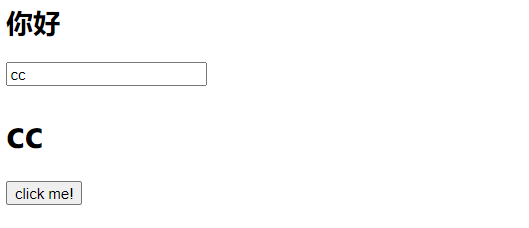
运行便可以可以看到标题标签模板数据被初始化,并成功的在一秒后改变,input标签也实现了和数据name的双向绑定,点击事件也可以成功触发

想看源码,请右转 github